
How to control risk in Oracle EBS and ERP Cloud
To control risk in Oracle EBS and Oracle ERP Cloud, govern effective access, verify sensitive configuration changes and monitor the transactions those permissions and settings enable. Connect each exception to its business context, assign someone who can intervene, and retain evidence that the issue was investigated and resolved.
The practical test is whether your team can explain how a payment became possible: who could change the supplier, what governed approval, and whether the transaction followed the authorised process. Reviewing these questions separately leaves finance, security and the Oracle applications team to reconstruct the sequence when something goes wrong.
Why separate Oracle controls can miss a connected risk
A transaction can pass several individual checks while the surrounding sequence warrants investigation. Consider this illustrative procure-to-pay scenario:
On Monday, an employee updates a supplier bank account using access retained from an earlier role.
On Tuesday, an administrator changes a payment approval rule without readily linked business authorisation.
On Wednesday, a large payment is released to the updated account.
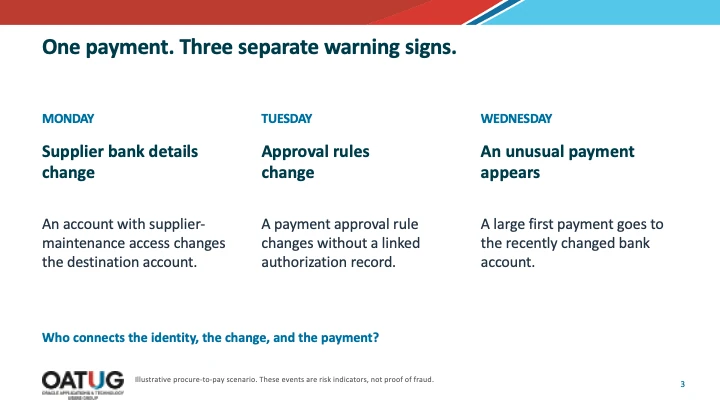
Each event could be legitimate. The control question is whether the supplier instruction was verified, the configuration change was authorised and the payment followed the correct approval route.
Security holds the access records; the applications team holds setup information; Accounts Payable and Treasury understand the payment. These records need to be joined around the supplier, executing identities and relevant time window. Otherwise, a change report can show what happened without establishing whether intervention is needed.
For a broader explanation of how these gaps develop, read how to keep Oracle ERP Cloud controls effective after go-live.
How to establish what an Oracle user can actually do
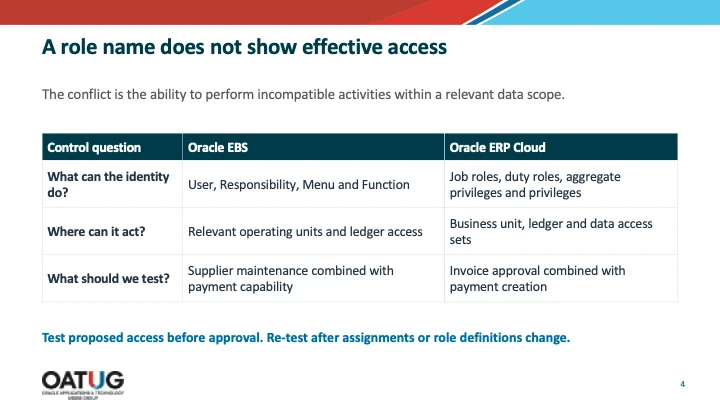
Assess effective permissions and data scope together. A responsibility or job-role name describes an assignment; it does not fully explain the authority available through it.
Oracle EBS responsibilities menus and functions
In Oracle E-Business Suite, trace assigned responsibilities through their menus and functions, accounting for exclusions and custom functionality. A familiar implementation shortcut is to copy a seeded superuser responsibility, rename it and remove only selected functionality. The resulting responsibility can retain more access than its business label suggests.
For supplier and payment activities, determine whether an identity can maintain supplier banking information and perform payment activities that your segregation of duties (SoD) policy requires you to separate. Include emergency support access and permissions retained after job changes.
Check operating-unit and ledger scope, including Multi-Org Access Control where applicable. A shared-services employee may legitimately support several operating units; establish whether that scope matches the person’s current responsibilities.
SafePaaS explains this analysis in its Oracle EBS access governance overview.
Oracle ERP Cloud roles, privileges and security context
In Oracle ERP Cloud, review job roles, inherited duty roles and privileges alongside the relevant security context. An Accounts Payable employee may have the correct functional role while retaining business-unit access from a previous assignment.
That distinction matters when evaluating SoD. Reviewers need to understand the conflicting activities and the business data over which those activities can be exercised. A role-level conflict report without relevant scope leaves the business owner to reconstruct the actual exposure.
The Oracle ERP Cloud access governance overview describes how SafePaaS evaluates underlying entitlements and security context.
Why access approval must be followed by reassessment
Test proposed access before granting it, then retest when changes affect the authority already approved. An access review records a decision at a point in time; the underlying application continues to change.
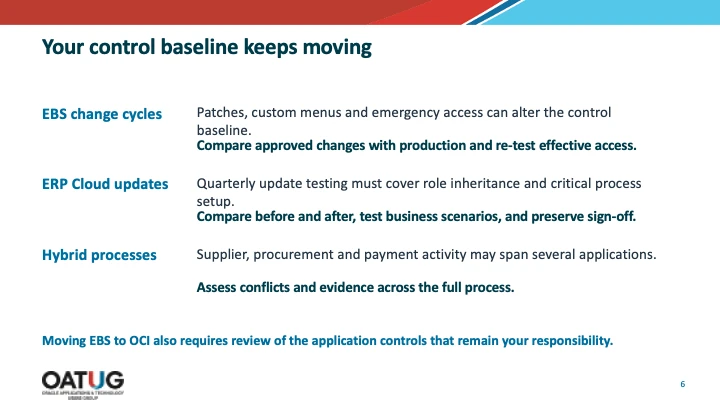
In EBS, adding a sensitive function to a responsibility’s menu can expand a user’s authority without changing their responsibility assignment. In ERP Cloud, changes to role hierarchies or privileges can alter what an existing role enables.
Use role changes, emergency grants, and relevant patches or quarterly updates as reassessment triggers. Test affected permissions and representative financial scenarios rather than assuming every update creates a conflict.
The outcome should be an explicit decision: approve the access, remove unnecessary permissions, redesign the role, or document an appropriate mitigating control. Record the owner, rationale, and review conditions of accepted exceptions so the exposure does not return as an unexplained finding.
How to govern configuration changes beyond the audit log
Verify that the implemented configuration matches the approved request, timing, and business scope. A log showing who changed a value does not establish that the change was appropriate.
Relevant EBS settings include approval limits, profile options and menu or function configurations. In ERP Cloud, approval rules and other sensitive setup attributes can affect transaction processing and authorisation.
Consider a temporary approval-limit increase during period close. The administrator may be authorised to make the change, but the control remains incomplete until someone verifies the implemented value and, where required, its restoration.
For each sensitive change, preserve:
The approved request and previous and implemented values.
The requester, approver, implementer and authorised implementation window.
The affected process, organisational scope and transaction population.
The review decision, corrective action and evidence of completion.
Apply this discipline across development, test and production. An approved design provides limited assurance if production differs from the configuration tested. SafePaaS change tracking capabilities explain how change records can support ongoing review and accountability.
Which transaction exceptions deserve immediate investigation
Prioritise exceptions using financial impact, corroborating evidence and the time remaining to intervene. An unusual amount alone tells a reviewer less than a payment associated with a recent bank change and an unexplained approval-rule change.
Start by establishing payment status. An authorised Accounts Payable or Treasury owner may be able to hold a pending payment under company procedures. Once released, the response may involve incident handling and recovery.
Verify supplier bank instructions through an established communication channel, rather than contact details supplied in a potentially suspect request. Connect the instruction, executing identity and approval history to the account used for payment. Determine whether the configuration change actually affected that transaction.
Duplicate-looking invoices and transactions below approval thresholds also require context. Recurring charges may be legitimate; several smaller invoices may have a valid business explanation. Review supplier references, business units, related documents and payment status before concluding that an exception represents error or misconduct.
Key takeaway: A useful monitoring control combines a relevant signal, timely data and an owner with authority to respond. A batch feed cannot support a promise of real-time prevention.
How AI and integration accounts change the control review
Trace automated activity from the initiating request to the account executing it in Oracle and the resulting transaction. The executing service account may be visible even when the human instruction behind it is harder to identify.
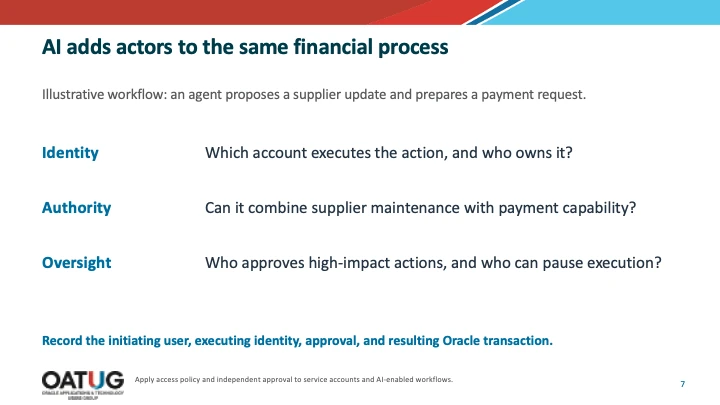
For example, an AI assistant might read supplier correspondence while an integration account authenticates and another account performs the update. Assess the workflow’s combined authority: can its tools or credentials maintain supplier details and influence payments?
Assign ownership to non-human identities, define independent approval for sensitive actions and test how the workflow can be disabled. Preserve the request, approval decision and transaction evidence. Automation should remain accountable to the financial authorisation policies governing the process.
Case study connecting Oracle ERP Cloud controls
A publicly listed software development company headquartered in London faced Oracle ERP Cloud SoD, remediation and transaction-risk challenges. Its experience illustrates how access design, configuration analysis and transaction investigation can support the same control programme.
Using SafePaaS, the company analysed role design against more than 50 access rules in development before go-live. Configuration analytics helped minimise issues caused by differences across conference room pilot, development, test and production instances.
Transaction analytics supported the remediation of 25 audit findings, while the company reduced the number of manual controls by 27%. These are results from this customer’s implementation, rather than a forecast for every Oracle environment.
The practical lesson is to connect potential exposure with evidence of activity. Access analysis identifies who could perform conflicting actions; transaction analysis helps investigators assess whether relevant activity occurred. Configuration analysis establishes whether the settings governing those actions match the intended design.
Read the Oracle ERP Cloud security and configuration risk case study to examine the customer’s challenges and results.
How to evaluate your next step
Begin with one procure-to-pay process. Trace a supplier bank change through access, authorisation and payment, then identify where evidence, ownership or response timing breaks down.
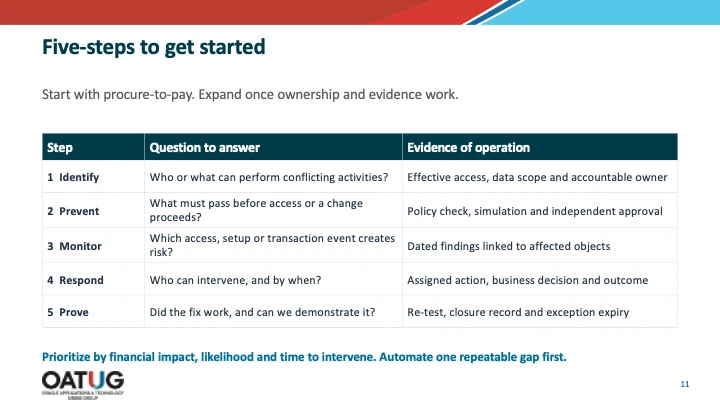
| Step | Question to answer | Evidence of operation |
|---|---|---|
| 1 Identify | Who or what can perform conflicting activities? | Effective access, data scope and accountable owner |
| 2 Prevent | What must pass before access or a change proceeds? | Policy check, simulation and independent approval |
| 3 Monitor | Which access, setup or transaction event creates risk? | Dated findings linked to affected objects |
| 4 Respond | Who can intervene, and by when? | Assigned action, business decision and outcome |
| 5 Prove | Did the fix work, and can we demonstrate it? | Re-test, closure record and exception expiry |
When evaluating automation, ask providers to demonstrate the Oracle entitlement detail, configuration evidence and transaction context your reviewers need. Check how exceptions reach the responsible business owner and how the team verifies remediation. Confirm monitoring frequency against the payment window.
Use the Oracle ERP Controls Self-Assessment Worksheet to assess your current gaps and select one repeatable control to automate first. Bring that process, its owners and a sample exception into the evaluation so the discussion centres on a decision your team needs to make.
See governance applied to the access you have today
A working session with a governance specialist — not a slide presentation.
Book your tailored demo