

Fall 2026
Fall
2026
Better access decisions start before provisioning
A message
from our CTO
An access approval should answer three questions: Does this person need the access? Is it limited to the right part of the business? Does it create a conflict with permissions they already hold?
As organizations examine authorization and accountability across business applications and emerging AI workflows, these questions deserve closer attention.
This issue focuses on Enterprise iAccess (EIA), which brings access visibility, organizational scoping, segregation of duties testing, and manager approval into a connected workflow. The aim is practical: give requestors and approvers the information they need to address risk before access is granted, with evidence captured throughout the process.
Thank you for your trust in SafePaaS. We look forward to building on your existing investments to strengthen compliance, improve security, and extend governance across your organization without a disruptive platform change.
Hennie Vermeulen
Enterprise iAccess: Review access risk before granting access
When access requests arrive through emails, spreadsheets, and disconnected tickets, approvers can struggle to see the full picture. A role may appear appropriate on its own but create a segregation of duties conflict when combined with existing permissions. Without organizational limits, it may also give someone access beyond their responsibilities.
Enterprise iAccess brings these decisions into a guided, self-service workflow within SafePaaS AccessPaaS.
Explore Enterprise iAccess in more detail →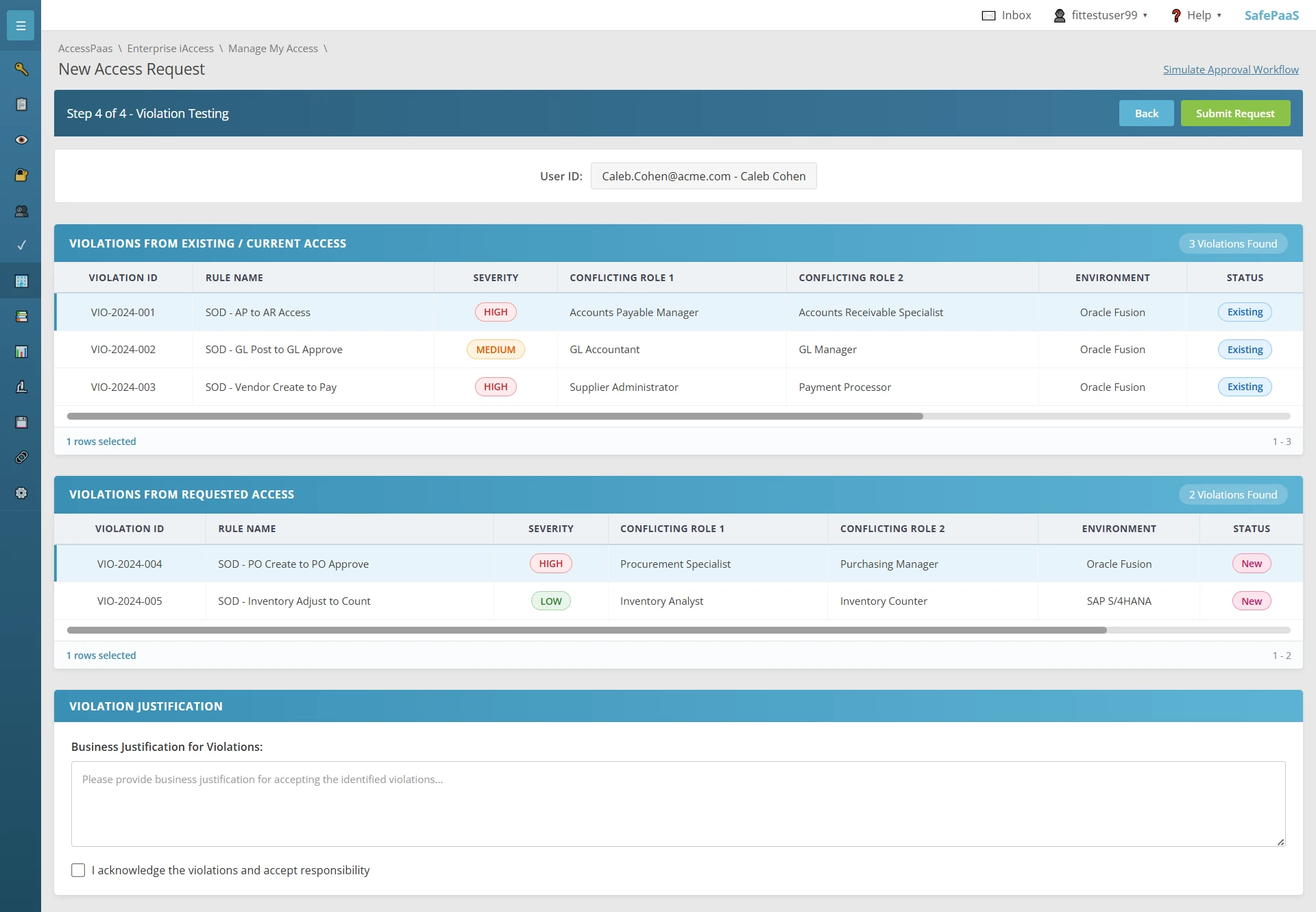
How It Works
Users—or administrators acting on their behalf—can review current roles and pending requests before requesting changes.
Requestors select roles and, where applicable, scope them to organizational attributes such as department, location, business unit, company code, or plant.
A comparison of current and requested access gives reviewers context and allows roles to be flagged for removal.
Before submission, EIA tests existing and requested roles for segregation of duties conflicts, classifies their severity, and requires a written business justification for unresolved violations.
Managers review the violation report within the approval workflow and select mitigation controls before approving.
Business Outcomes
As authorization requirements receive greater attention, the practical priority is to make each access decision specific, accountable, and traceable. EIA supports that discipline by connecting role selection, risk review, mitigation, and approval. Request and status history provides evidence of how access moved from submission through approval and provisioning.
Automate Your Mover, Joiner, Leaver Process
Most access changes begin in the HR system: someone joins, moves to a new job or leaves. When SafePaaS learns about those changes from a scheduled nightly extraction, a joiner can wait hours or days for the access the job needs, and a leaver who goes at 9:00 AM can keep their access until the next morning.
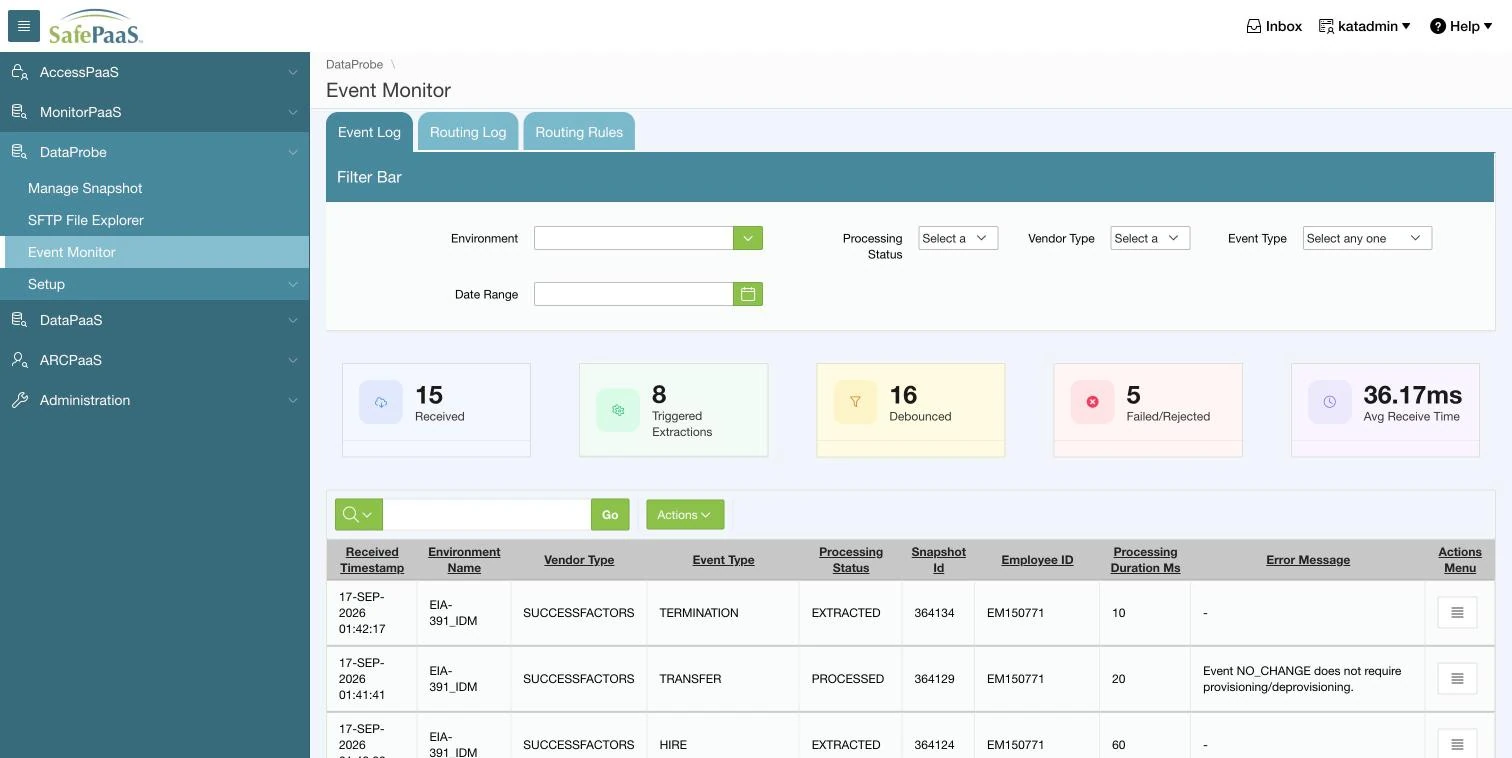
Enterprise iAccess now runs the mover, joiner, leaver (MJL) process from your HR system. When an employee is hired, transferred or terminated, the HR system notifies SafePaaS. Within seconds, SafePaaS retrieves that one employee’s record, works out what access they should now hold and raises the request to grant or remove it.
An employee’s department and position determine the roles they should hold, and those roles are granted automatically when an HR event tells SafePaaS that something has changed.
How It Works
Record each job title with the code that arrives in your identity data, one at a time or by uploading a file.
Attach the People Role a job is entitled to, for a single position or for every position in a department. One People Role can carry the roles a job needs in several systems.
Your HR system notifies SafePaaS of each hire, transfer and termination. SafePaaS accepts the notification immediately and retrieves only that employee’s record.
Routing rules generated from your Enterprise IT Map decide which environments act on each type of event, and in what order.
SafePaaS raises the request and completes it without an approver. A transfer that changes nothing is recognised and closed without granting or removing anything.
Business Outcomes
Access should follow the job, not the overnight batch. Running the mover, joiner, leaver process from HR events narrows the window in which a leaver keeps access or a joiner waits for it, and each change carries a record from the HR notification to the request it produced.
From Rigid Monitoring to Reusable, Rule-Based Governance
For years, monitoring logic in SafePaaS lived inside the extraction pipeline: one object per monitor, hard to reuse and slow to change. Adjusting a control, or adding a near-duplicate-invoice check, meant going back into data engineering.
SafePaaS Transaction Governor, now in MonitorPaaS, separates data loading from governance logic. Monitors are built in a guided designer on the same DataPaaS objects that power other controls, with exact or fuzzy rules, and every exception routes through a built-in review workflow with reviewers, approvers, SLAs and escalation.
Transaction Governor turns ERP transaction monitoring into a configuration exercise — reusing data, separating rules from extraction, and routing exceptions through a clean review workflow.
How It Works
Start from the DataPaaS objects your other controls already use, and choose the fields the monitor needs.
Join objects when a control spans more than one, then build the rule logic in a visual AND / OR tree with exact comparisons or fuzzy text matching.
Select the columns each exception shows, and assign a reviewer, an optional approver, SLAs and escalation.
Monitor runs are scheduled separately from data snapshots, and a snapshot older than its age threshold is refreshed before a result is produced.
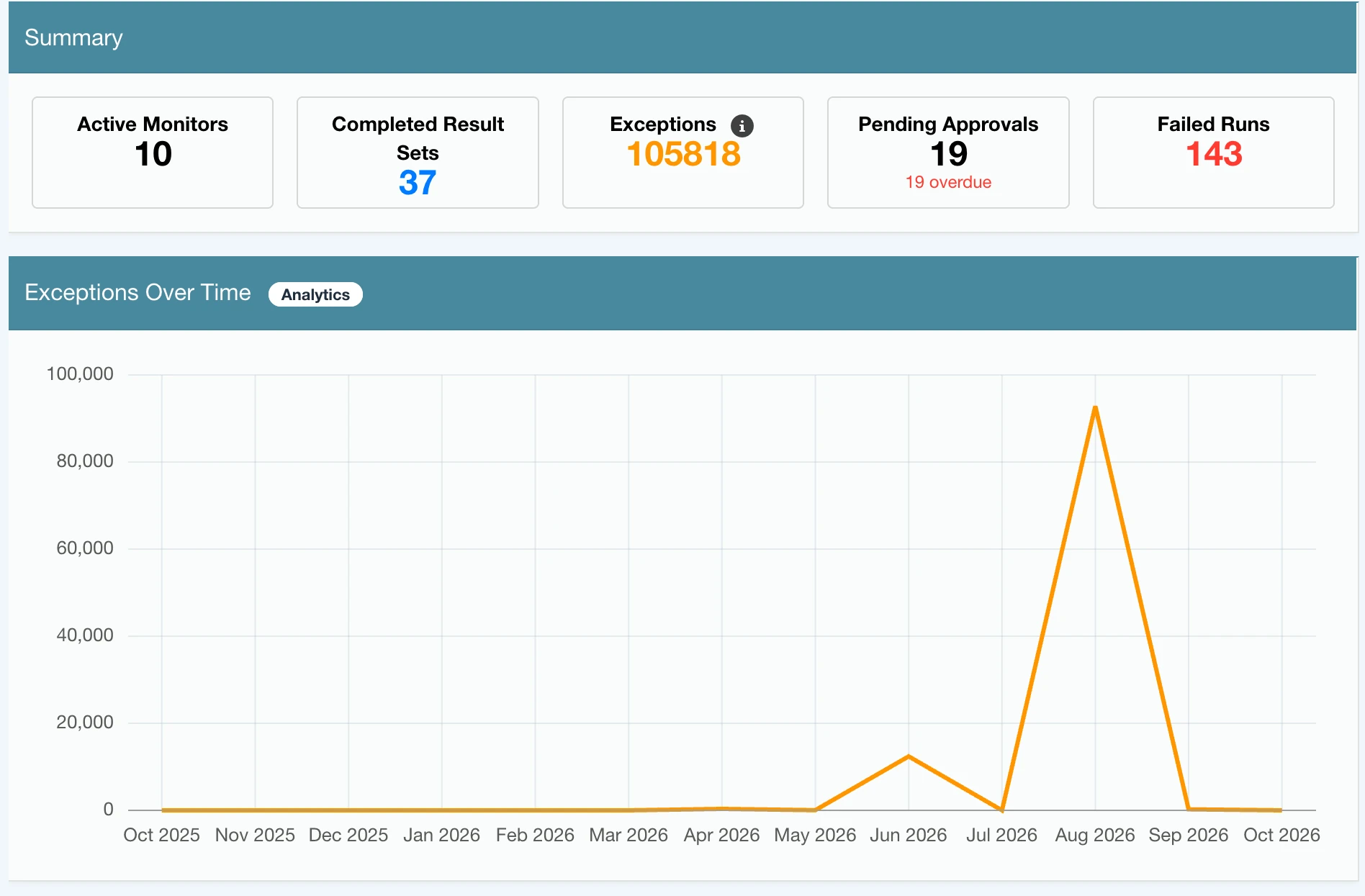
One dashboard shows active monitors, exceptions, pending approvals and failed runs, and every figure opens the result sets behind it.
Business Outcomes
Monitoring that lives in configuration rather than in the data pipeline can change as quickly as the risks it watches, and every exception it raises carries its review and approval with it.
Find the Access Risks That Actually Materialized
A segregation-of-duties rule tells you a user could do two conflicting things. It does not tell you whether they did.
Materialized Risk Analysis is built to answer:
It attaches a transaction monitor to an access rule, runs the monitor whenever the rule is tested, and reports which access risks were actually exercised.
How Materialized Risk Analysis Works
Each half of a segregation-of-duties rule is linked to the transactions behind it, and the rule’s monitor runs in Transaction Governor as part of the ordinary SOD test.
Four steps, the first done once per activity:
An activity is mapped once, and every rule that uses it benefits.
Act First on the Risks That Were Exercised
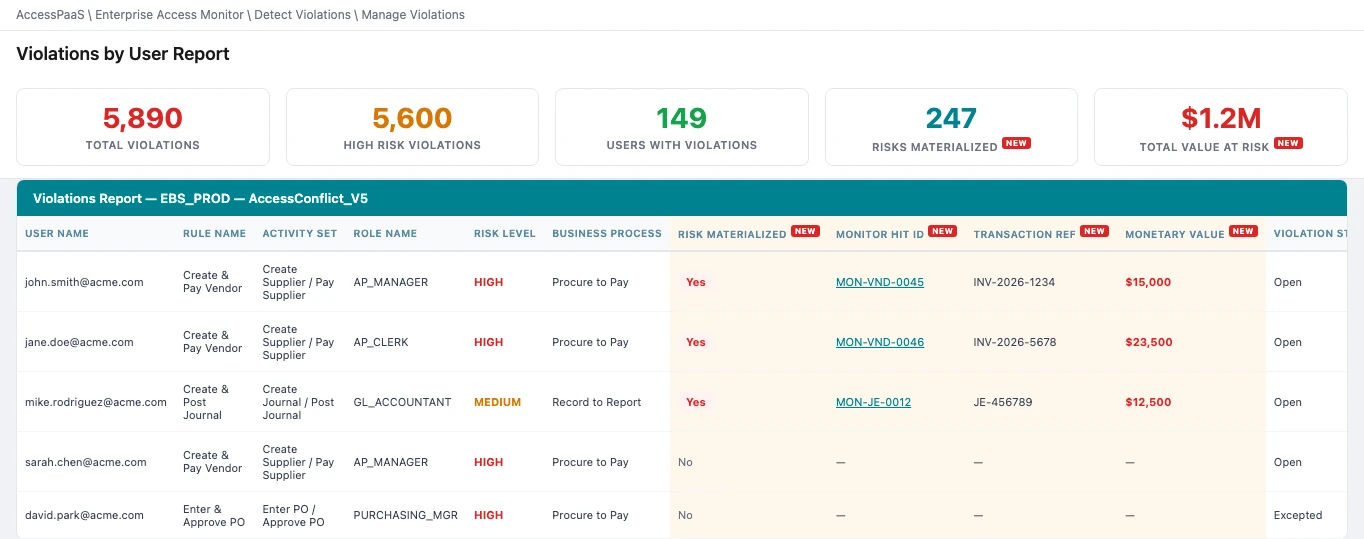
The Violations by User Report gains two totals and five columns, so the violations that materialized stand apart from the rest.
Added to the report:
A violation where the user never performed the transaction is a risk on paper. One where they did is a risk that has materialized — and it is the one to investigate first.
Customer spotlight
A semiconductor equipment manufacturer managing around 1,000 Oracle ERP Cloud identities relied on spreadsheets and emails for access governance, making quarterly reviews slow and audit preparation demanding. SafePaaS introduced automated certifications, preventive segregation of duties checks and continuous monitoring. Within one year, quarterly access review effort fell by over 50%, while average remediation and mitigation time dropped from 10 days to four.
Read the semiconductor case study →A global fast-food chain migrating from Oracle E-Business Suite to Oracle ERP Cloud needed to strengthen segregation of duties and manage complex permissions without delaying the transition. SafePaaS enabled detailed access analysis, compensating controls and remediation through ServiceNow, supported by audit analytics. The company achieved a 99% reduction in control violations, accelerated cloud deployment and strengthened evidence of control effectiveness.
Read the fast-food case study →A telecommunications company preparing for a stock-exchange listing needed to replace manual Oracle access assignments and strengthen SOX audit evidence. SafePaaS automated provisioning, introduced preventive segregation of duties checks and established continuous monitoring and remediation workflows. Annual access-assignment costs fell from approximately $120,000 to near zero, and the company achieved SOX certification with zero findings related to Oracle EBS IT general controls.
Read the telecommunications case study →Would you like to learn more about the capabilities featured in this newsletter?
The SafePaaS Customer Success Team can help you: