Summer 2026
Summer
2026
Identity lifecycle, IT General Controls automation, and a first look at Identity 360.
A Message
from Our CTO
Identity lifecycle management remains a critical governance challenge as organizations extend core ERP capabilities with best-of-breed SaaS solutions and integrate multicloud architectures with on-premises systems.
Many organizations use Identity Governance and Administration (IGA) solutions to manage Joiner, Mover, and Leaver processes. However, traditional IGA solutions often fall short of auditors’ compliance expectations. They do not prevent risk during access requests, and periodic reviews may exclude critical identities provisioned outside the IGA platform. Deployments can also be costly and leave identity sources uncovered when vendor connectors are unavailable.
To address these challenges, SafePaaS has introduced two capabilities:
ONE Self-service application onboarding with guided identity-object mapping and role configuration, enabling rapid, affordable coverage for identity lifecycle management and periodic certification.
TWO Enterprise provisioning and deprovisioning of identity roles and privileges across multiple applications using the “People” Role, helping align Human Capital Management and application roles for optimal performance at the lowest acceptable risk level.
We have also expanded our IT General Controls assessment and certification capabilities in response to another growing customer challenge: managing third-party risk across an increasingly complex landscape of cloud and on-premises servers, databases, networks, applications, and service providers.
SafePaaS can support SOX 302 and SOX 404 control testing while automating ITGC assessments and certifications for financial, IT, and operational controls through an integrated risk management platform. This enables organizations to standardize testing, improve accountability, connect findings with remediation, and provide more complete evidence to auditors and other stakeholders.
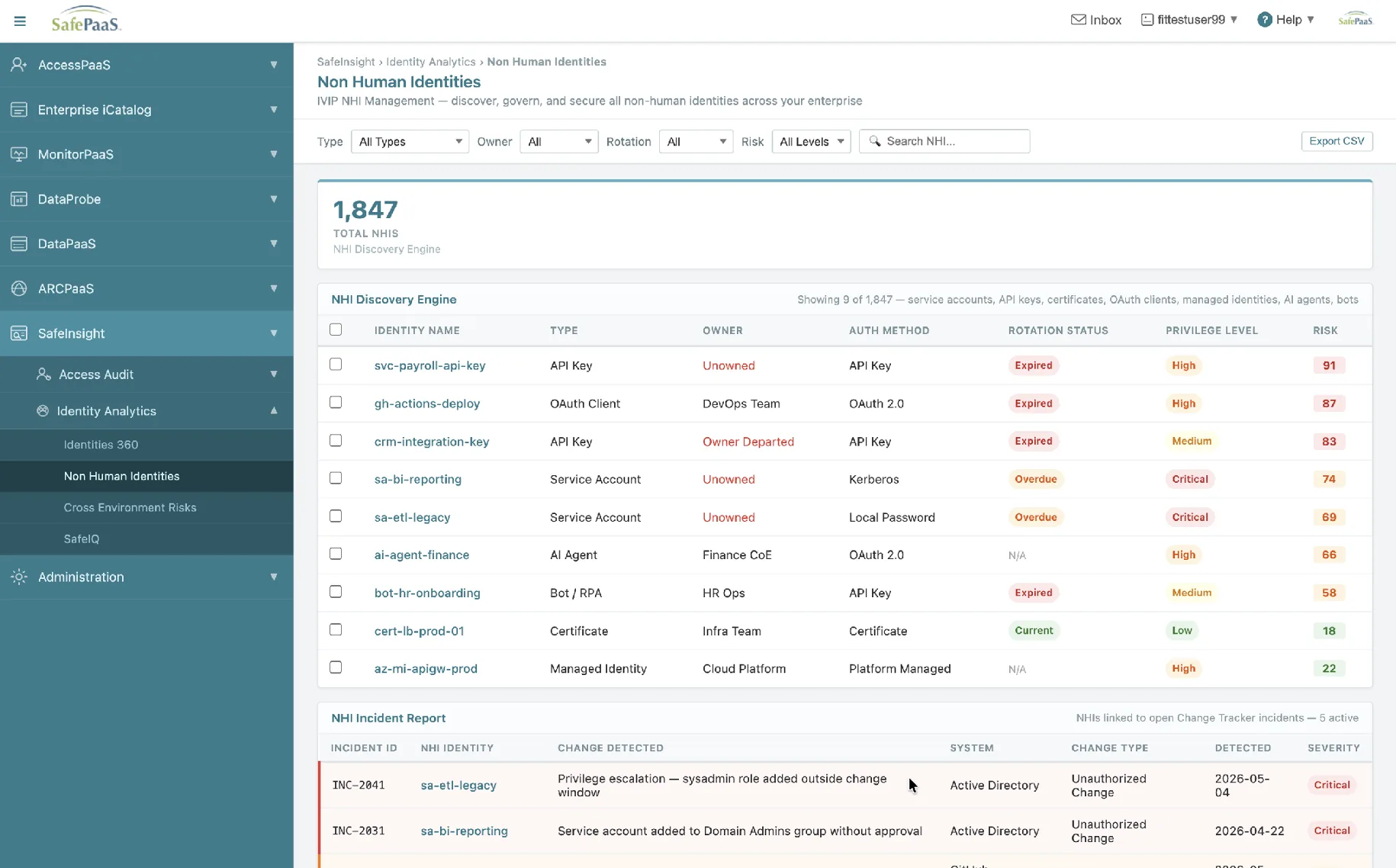
Looking ahead, we are developing Identity 360 to provide broader visibility across human and non-human identities, including service accounts, APIs, bots, shared accounts, automation, and AI agents. As these identities become more prevalent, organizations will need a consistent way to understand their access, activity, and associated risk across the enterprise.
Thank you for your continued partnership with SafePaaS. We look forward to helping you strengthen compliance, improve security, and gain greater value from your existing identity governance and risk management investments without requiring a disruptive platform replacement.
Onboard Security Data from Any Application. No Connector Required
Not every business application has a pre-built connector, but that shouldn’t prevent you from bringing it under governance. DataPaaS Guided Onboarding is a new self-service wizard that lets administrators upload security data directly from a CSV or Excel file and onboard users, roles, privileges, and assignments in minutes without coding, custom integrations, or development projects.
The six-step guided workflow validates your data before it’s imported, automatically provisions the required DataPaaS components, and applies your existing transformation and mapping rules. Once loaded, the data behaves exactly like information collected through a native connector, enabling access monitoring, segregation of duties analysis, reporting, and certifications using the same SafePaaS capabilities.
matters
With Guided Onboarding, you no longer need to wait for a connector to govern a new application. You can quickly extend governance to virtually any system, catch mapping errors before data is loaded, reuse saved mapping profiles for future imports, and maintain a complete audit history of every import. The result is faster onboarding, broader application coverage, and self-service governance without additional integration effort.
Integrated People Role Creation, Mapping & Provisioning
Access requests are often expressed in business terms, but fulfilled through technical ERP roles and application entitlements that managers do not understand.
A new employee may require access across five or six systems. IT must determine which technical roles to assign, managers are asked to approve unfamiliar role names, and segregation of duties conflicts may not be discovered until after access has been granted.
SafePaaS People Role Management connects the way the business defines a job with the way access is provisioned.
Administrators can create business-friendly People Roles such as AP Manager, Finance Controller, or Procurement Analyst, then map each one to the required roles, privileges, and security contexts across connected applications. SafePaaS checks the role design for segregation of duties conflicts and applies the appropriate approval and provisioning workflow.
Explore People Role Management in more detail →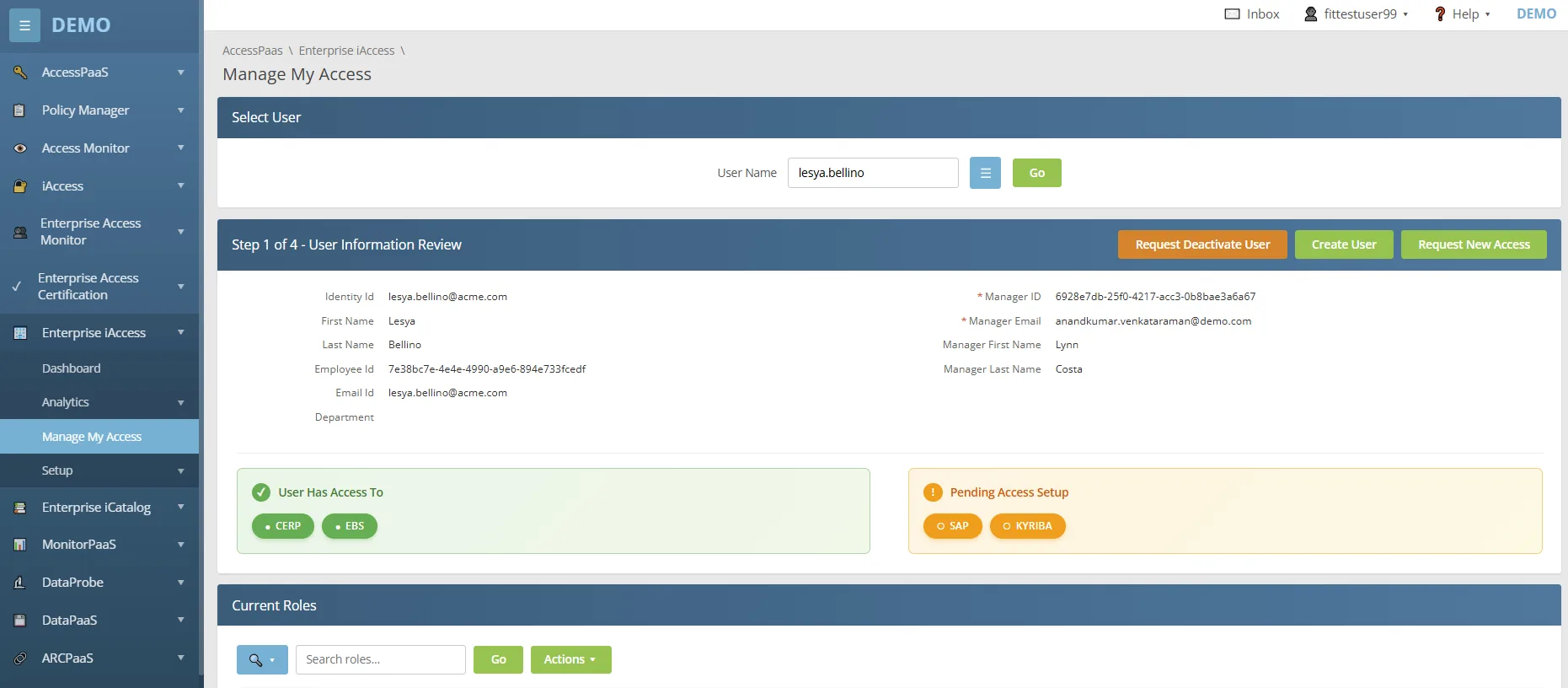
How It Works
Create a People Role using a clear job-based name, description, risk level, and designated owner.
Add the ERP roles, application roles, privileges, and relevant security contexts required for that job function.
SafePaaS evaluates the mapped access against segregation of duties policies while the People Role is being created and again when a user requests it.
Clean requests move through the appropriate approval workflow. Requests with conflicts require business justification before access can be approved.
Once approved, SafePaaS sends provisioning instructions to connected systems and records every decision, assignment, and outcome in a versioned audit log. Administrators can monitor provisioning status and retrigger failed assignments from one report.
Business Outcomes
Identify roles that generate frequent access tickets—such as Accounts Payable, Procurement, Finance, or Human Resources—and convert them into standardized People Roles. This can deliver an immediate improvement in provisioning speed, approval quality, and policy enforcement.
Scale and Automate IT General Controls Testing Across an Expanding Digital Landscape
The challenge is no longer simply having a compliance process, it is ensuring that process can keep pace with an expanding technology landscape spanning cloud and on-premises applications, servers, databases, networks, infrastructure, and third-party service providers.
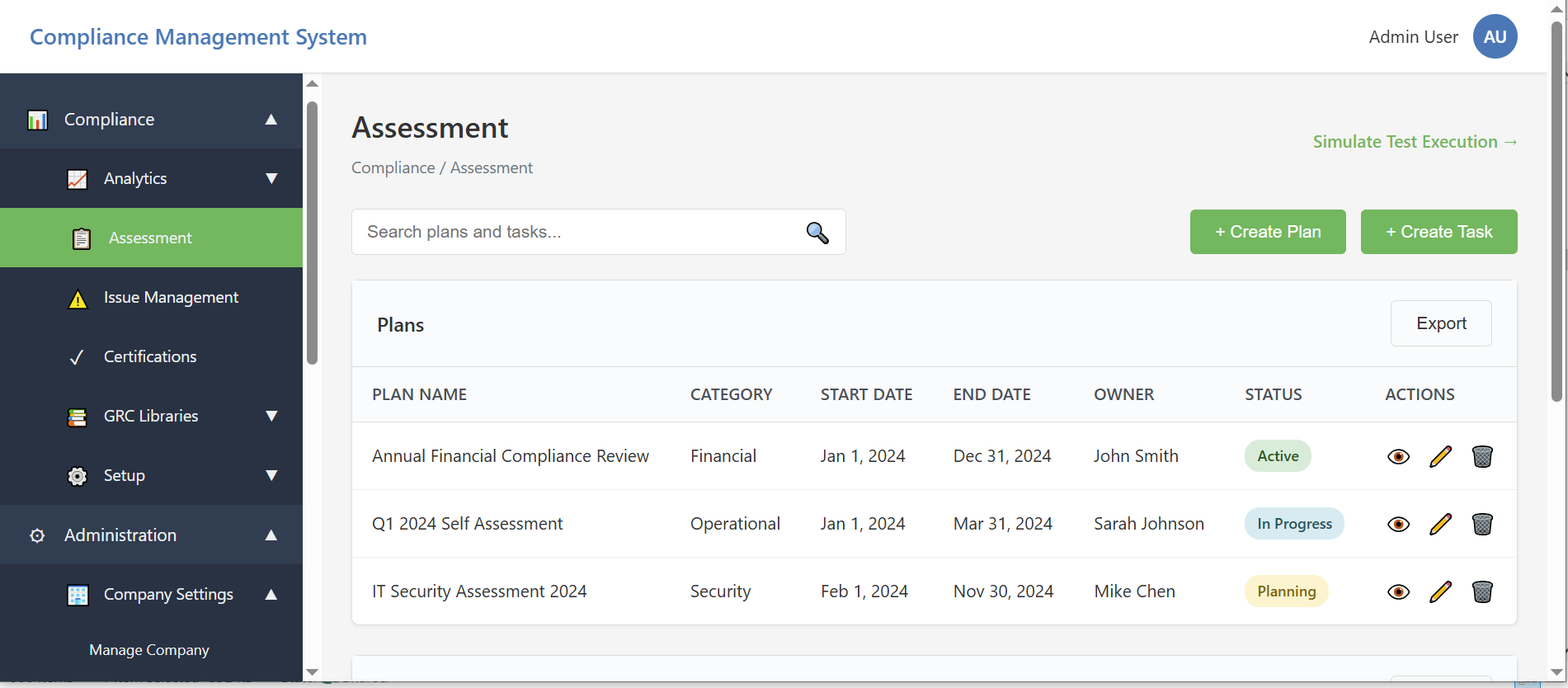
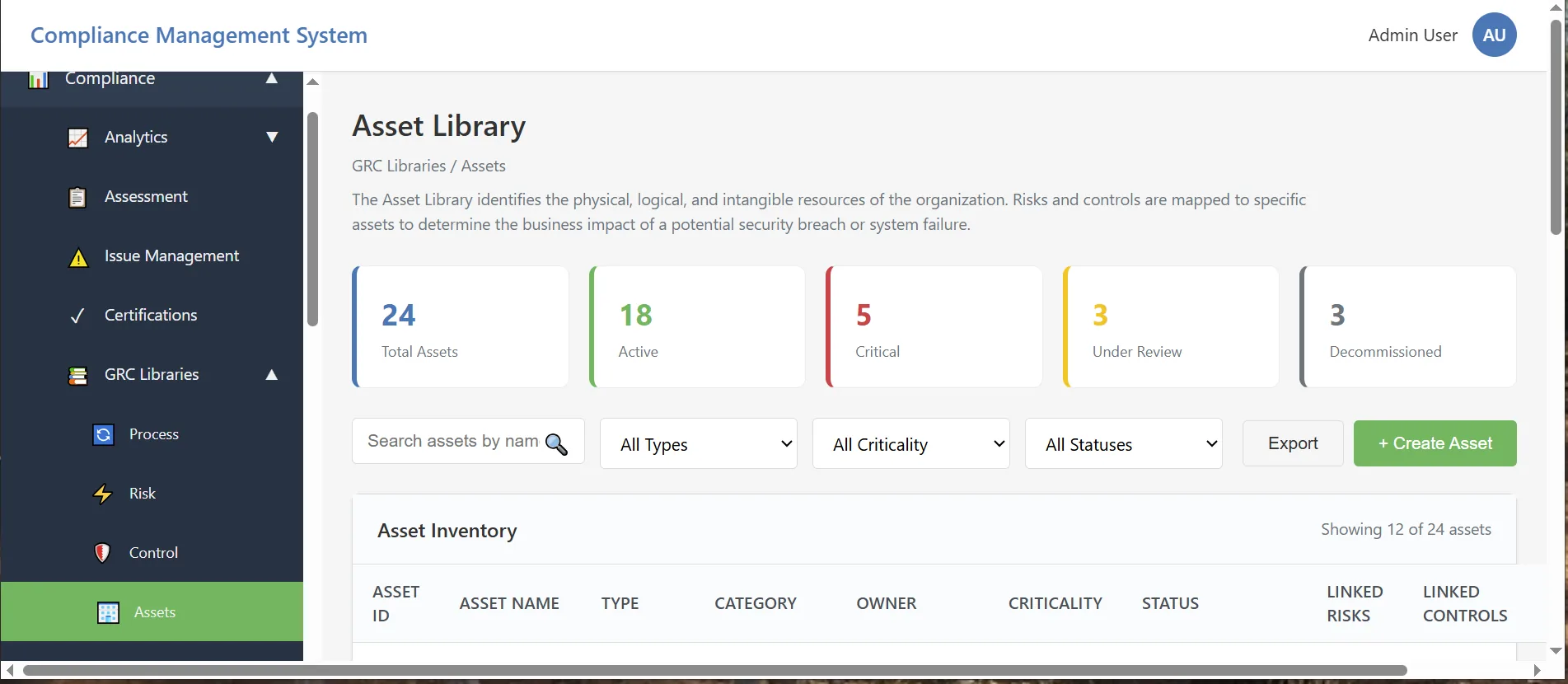
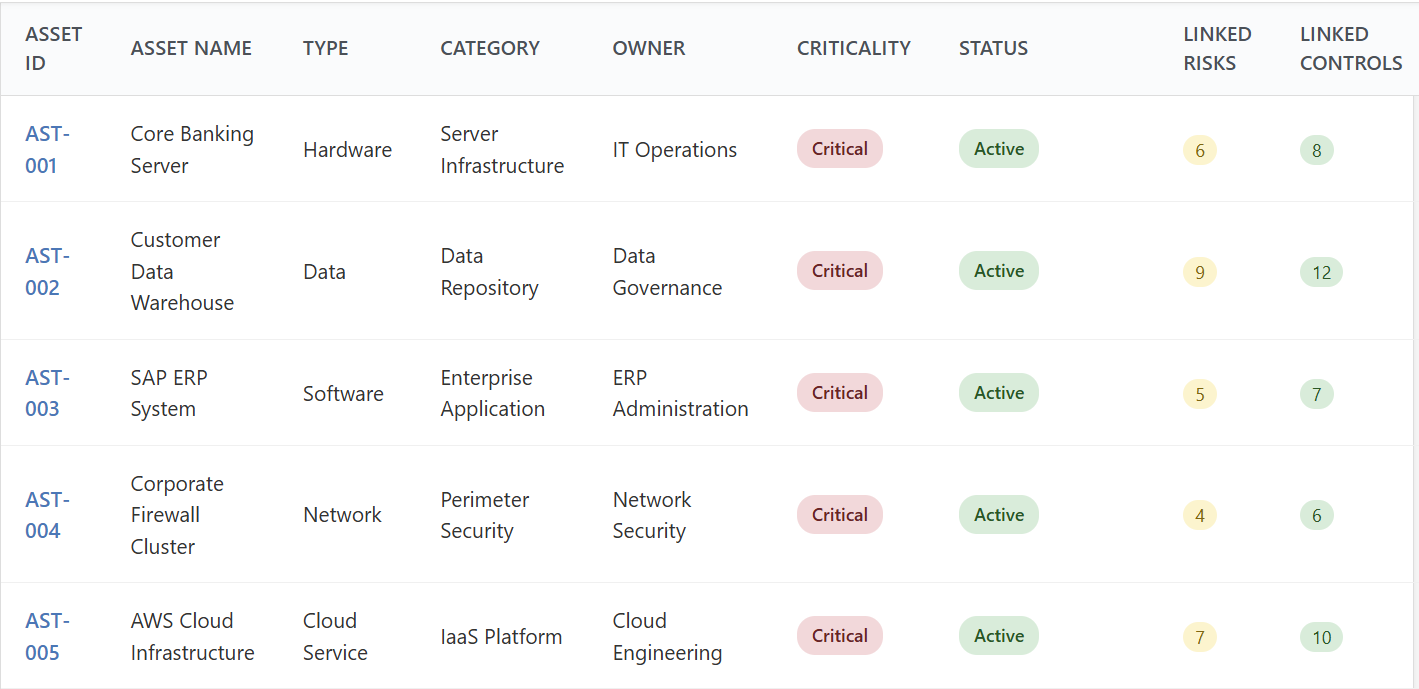
GRC libraries · Assets
When control testing relies on spreadsheets, email, shared folders, and disconnected tracking systems, even basic questions become difficult to answer:
SafePaaS IT General Controls Automation connects assessments, certifications, evidence, findings, remediation, and reporting in one integrated process.
Automate the Control Testing Lifecycle
SafePaaS enables compliance, IT, risk, and audit teams to:
As the digital environment expands, scaling manual control testing is neither efficient nor sustainable. SafePaaS helps organizations standardize IT General Controls testing across the enterprise, strengthen accountability, identify delays earlier, and connect findings directly to remediation. The result is less time spent coordinating compliance activities and greater confidence that control status and audit evidence are complete, current, and traceable.
Learn more about ITGCs and SOX →See Every Identity in One Place
Most organizations can quickly identify their employees.
Far fewer can answer:
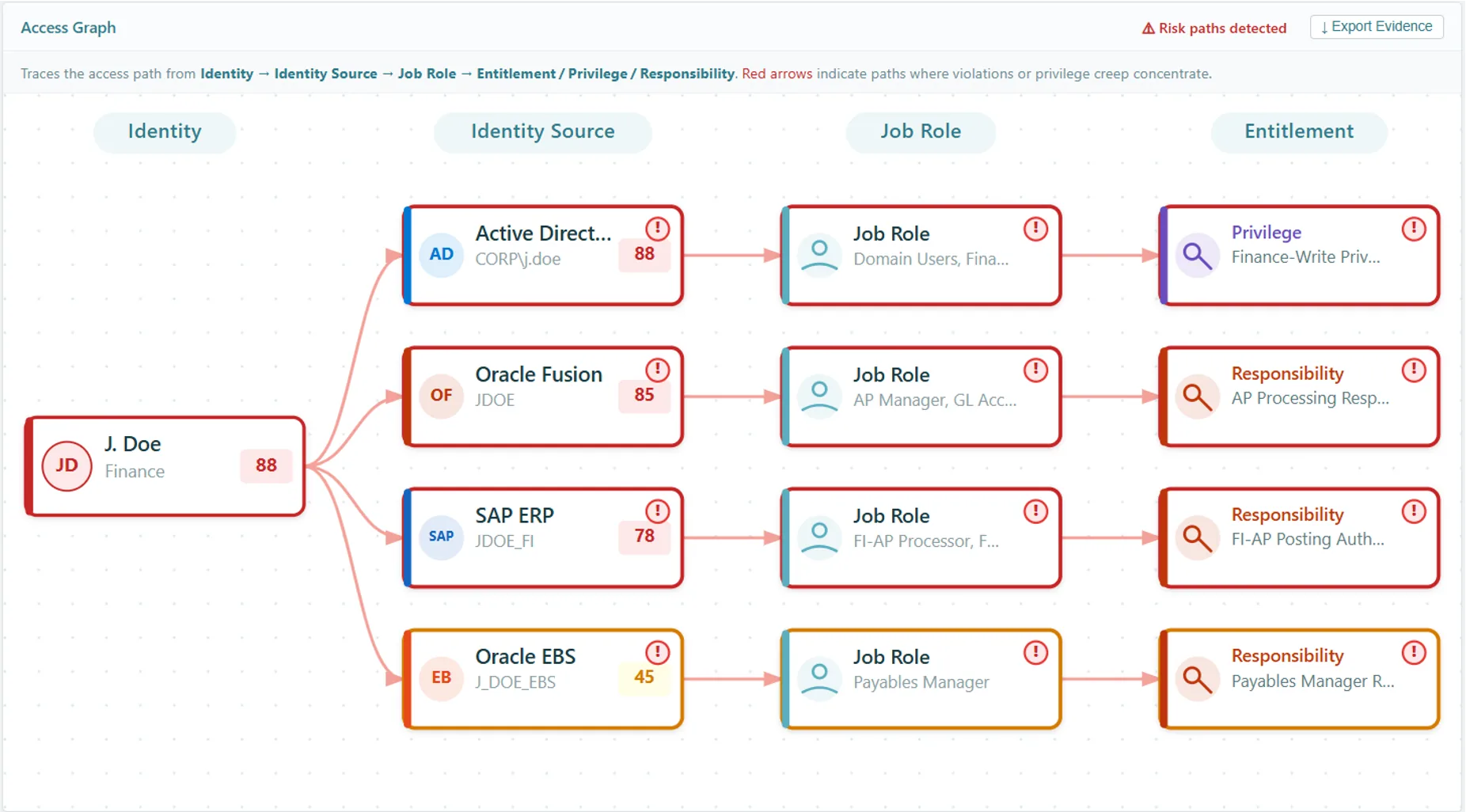
Identity 360 provides a complete inventory of human and non-human identities across the enterprise, helping organizations understand who—or what—has access to critical business systems.
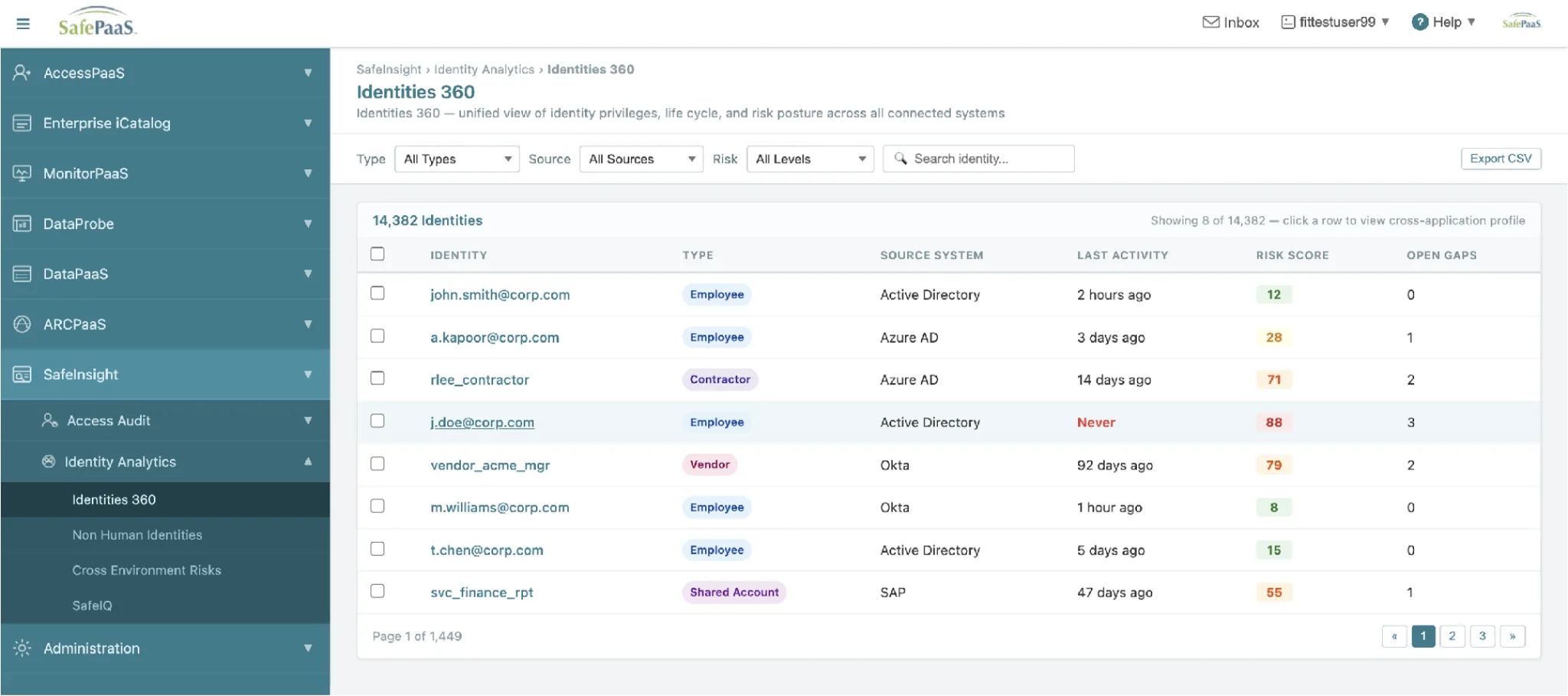
How Identity 360 Works
Identity 360 continuously collects identity data from connected systems, including Active Directory, Microsoft Entra ID, Okta, Oracle, SAP, Salesforce, and other business applications.
Each identity is automatically:
Instead of searching across multiple directories and applications, teams can work from a single, searchable inventory that stays current as the environment changes.
Quickly Identify the Identities That Need Attention
Complete visibility is valuable, but knowing where to focus first is essential.
Identity 360 evaluates identities using multiple risk indicators, helping teams prioritize accounts that require immediate review, including:
Rather than manually reviewing thousands of identities, administrators can focus immediately on those presenting the greatest business risk.
Modernizing Oracle GRC: How a U.S. Federal Agency Simplified Access Governance and Continuous Monitoring
When Oracle announced the end of support for Oracle Governance, Risk, and Compliance (GRC), organizations faced an important decision: migrate to multiple point solutions, build custom processes, or adopt a modern governance platform.
One U.S. federal agency used this transition to modernize its identity governance and compliance program with SafePaaS.
The agency needed more than a like-for-like replacement. It wanted greater visibility into user access, more automated governance processes, and less manual effort supporting audits across its Oracle E-Business Suite environment.
With SafePaaS, the agency brought access governance, segregation of duties, access certifications, provisioning workflows, continuous controls monitoring, and audit reporting together on a single cloud platform. Rather than recreating legacy GRC processes, it redesigned them to improve automation, increase visibility, and reduce administrative overhead.
With SafePaaS, the agency can now:
Many Oracle E-Business Suite customers are now planning their Oracle GRC migration strategies. Modernization is not simply about replacing an end-of-life product; it is an opportunity to simplify governance, improve audit readiness, and reduce the effort required to maintain compliance.
SafePaaS provides a unified platform for identity governance, segregation of duties, access certifications, compliance automation, and continuous monitoring, helping organizations strengthen controls while reducing manual work.
Managers Can Review Actual User Permissions not Just Business Roles
Many organizations believe they conduct comprehensive access reviews because managers approve users based on business roles. In practice, reviewers often see only the assigned role’s name not the underlying entitlements and privileges that determine what a user can actually do.
For example, a manager may approve a user with an Accounts Payable Manager role without knowing that it also permits the user to create suppliers, modify payment details, or approve invoices above a specified threshold.
Without this visibility, managers may approve access they cannot fully evaluate.
See the Access That Really Matters
SafePaaS allows reviewers to examine the entitlements and privileges behind each role, providing the context needed to make informed certification decisions.
Instead of reviewing role names alone, managers can evaluate:
This helps reviewers understand exactly what they are approving while providing stronger evidence for auditors.
Get More from Your Access Reviews
If you already use SafePaaS Access Reviews, consider these best practices:
These changes can significantly improve certification decisions while reducing the effort required during audits.
Before launching your next certification campaign, ask:
If the answer is no, consider enabling entitlement-level reviews. Giving managers more context leads to better certification decisions, stronger compliance evidence, and more meaningful access governance.
Get Started with Access Reviews →Would you like to learn more about the capabilities featured in this newsletter?
The SafePaaS Customer Success Team can help you:
Recent enhancements
Included email address for a user in the Violations reports to allow users to view and report on email infomration within the affected reports.
Enhanced metadata snapshot extraction performance using parallel processing
Enhanced the DataPaaS snapshots to include details through a link to the snapshot details page.
Enhanced the Incident approval for Monitors to allow user that receive the incident notifications to Approve or Reject the incidents.
Introduced the ability to Request Email notification/intimation On Approved access
Introduced the ability to Request To Show Violations Only For Requested Role